Andrew Park

  • One Sales Page Per Course vs a Netflix-Style Catalog

    One Sales Page Per Course vs a Netflix-Style Catalog

    Why the way your courses are displayed affects how many you sell, and how much work it takes to sell them.

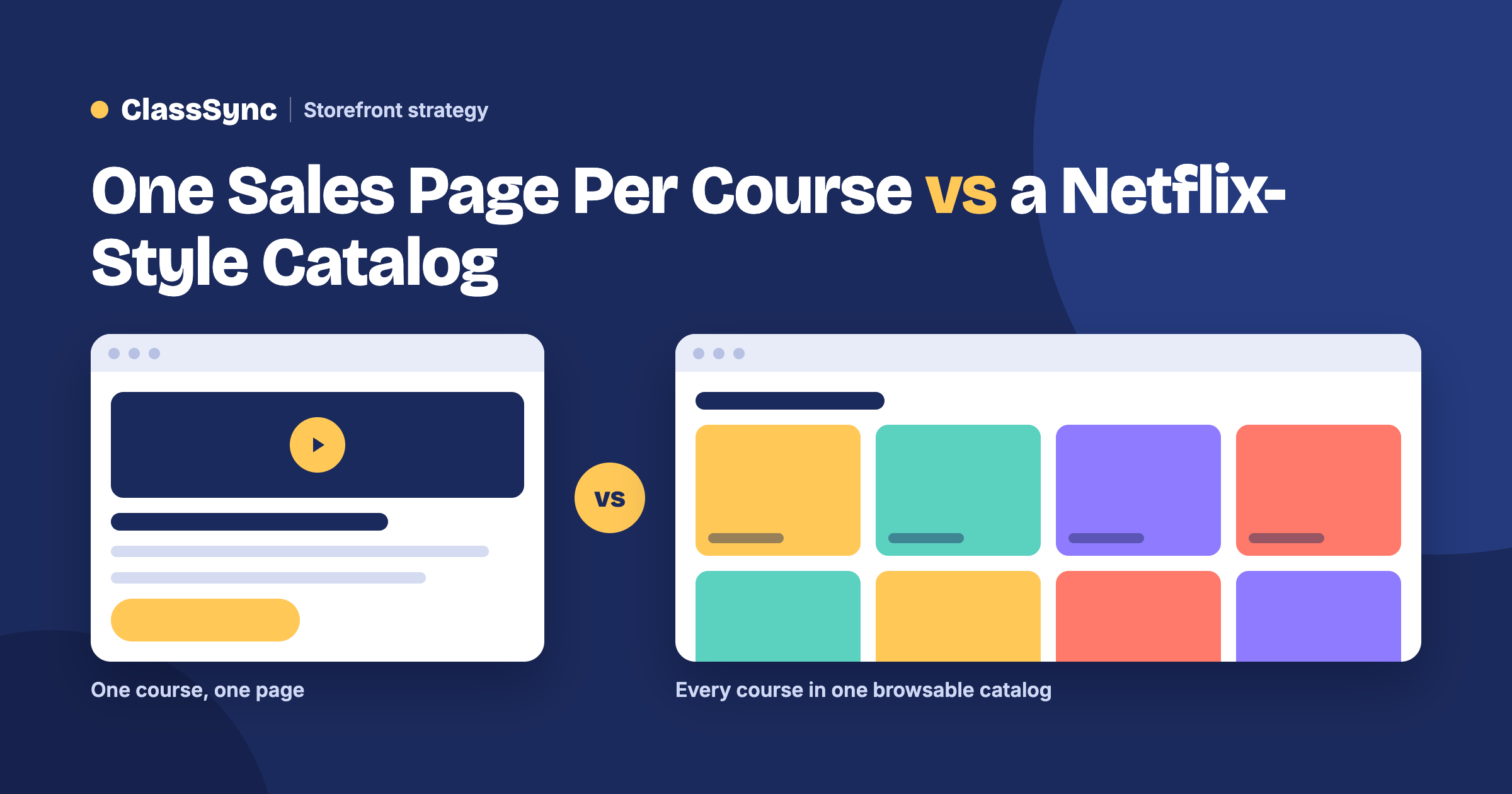
    The short answer: most course platforms, like Kajabi and Teachable, are built around one sales page per course. Visitors land on a single offer, pay, and only then see the course inside. Every new course means another page to build, and buyers may never see your other courses unless you build extra pages to show them. A Netflix-style catalog, like ClassSync’s, shows all your courses on one storefront, organized by category, so every visitor sees everything you offer and is more likely to find their next course.

    If you only ever plan to sell one course, the one-page model works fine. But most people who teach online don’t stop at one. In a GetResponse survey of 1,000 course creators, almost 90% said they create multiple courses. A piano teacher adds a beginner and an advanced level. A baker adds breads after cakes. A tutor adds SAT prep after algebra. That’s where the layout you choose starts to matter.

    How the one-sales-page-per-course model works
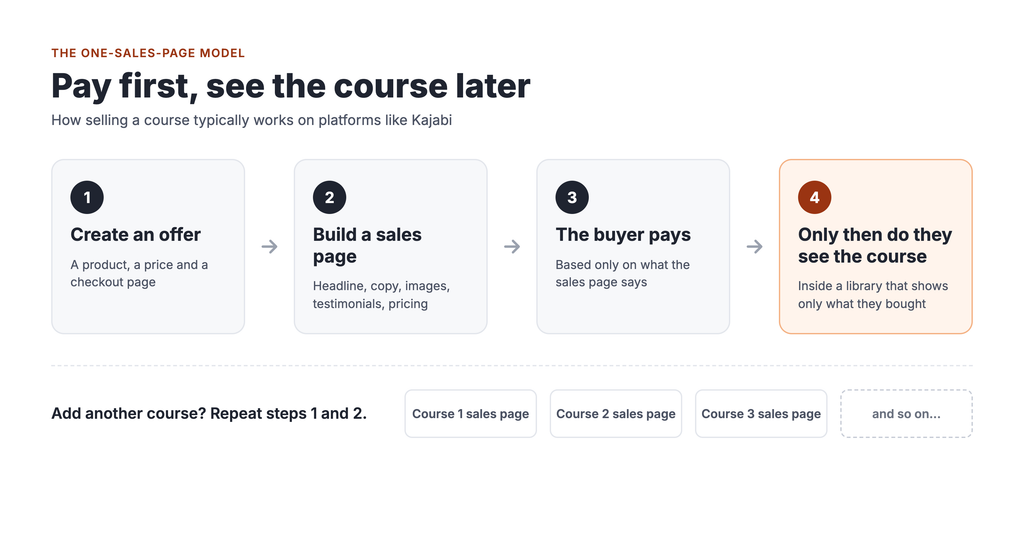
    Here’s how selling a course typically works on Kajabi, based on Kajabi’s own help documentation:

    1. You create an Offer. Kajabi describes an Offer as one or more products combined with a price, a checkout page and a post-purchase experience.
    2. You build a page to sell it. The Offer gets its own checkout page, and Kajabi’s help docs note that if you don’t share the link, the Offer won’t be easy to find. So you build a sales or landing page and send people to it.
    3. The buyer pays.
    4. Only then do they see the course. After purchase, customers land in their Library, which Kajabi says only shows the products that customer has bought or been granted.

    Teachable works in a similar way. Teachable automatically creates a sales page for each course, which it calls the main landing page for that course. It also offers a course directory page that lists all your courses, but each one still leads to its own separate sales page.

    To be fair, both platforms have ways to promote other courses. Kajabi lets you add recommended offers to a customer’s Library, and both support upsells after checkout. But those tools mostly work after someone has already bought, and each one is something else to set up.

    The hidden costs of one page per course
    Every new course is a new web project

    Each course needs its own sales page: a headline, a description, images, testimonials, pricing, a checkout and links from the rest of your site. For your first course, that’s a fun project. By your fifth or tenth, it’s a chore that eats into time you could spend teaching.

    You may end up paying someone to build them

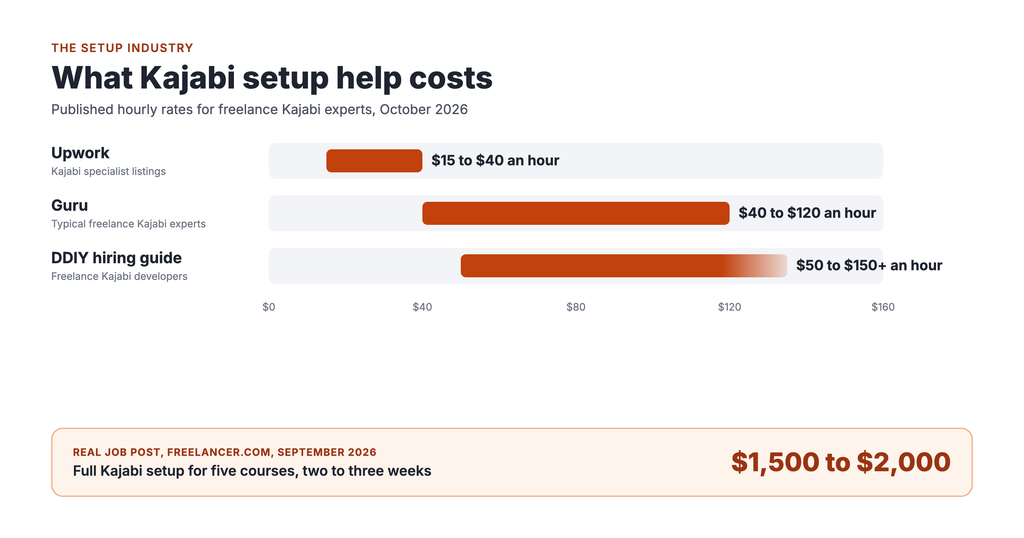
    Building good sales pages takes design and copywriting skills many teachers, parents and hobbyists don’t have, and that’s where a whole setup industry comes in. Kajabi runs its own marketplace of experts for hire, and freelance Kajabi specialists list rates from about $15 to over $150 an hour. One real job post on Freelancer.com offered $1,500 to $2,000 to set up a Kajabi site with five courses. Each new course can mean another invoice.

    Your other courses stay hidden

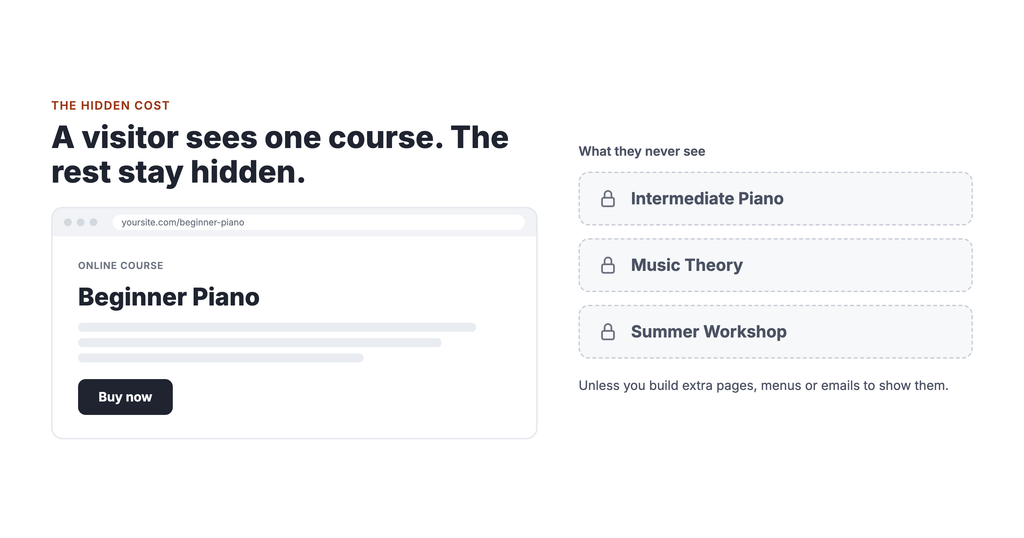
    This is the cost most people never notice. Someone who finds your beginner piano sales page sees beginner piano. They don’t see your intermediate course, your music theory course or your summer workshop, unless you’ve built extra pages, menus or email sequences to show them.

    A visitor who leaves without seeing your full catalog can be a sale you’ll never know you missed.

    The catalog model: let people browse
    Think about how you pick something to watch on Netflix. You don’t land on a sales page for one movie. You open the app and scroll through rows: Continue Watching, Trending Now, Comedies. You find things you weren’t looking for.

    That’s not an accident. In a 2015 paper, Netflix’s own product leaders reported that its recommendation system, which powers those rows, influences choice for about 80% of hours streamed. Only a minority of viewing starts with a search.

    A course catalog isn’t Netflix, and a small academy won’t have Netflix’s personalization. But the principle is worth borrowing: show people more, and they have more to discover.

    A catalog storefront works like this:

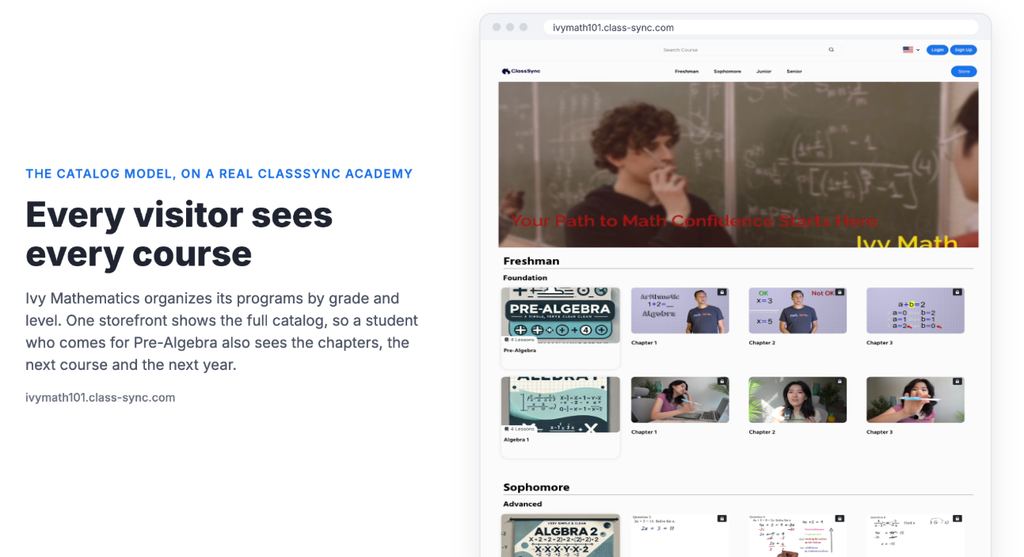
    1. A visitor lands on your academy and sees all your courses, organized into clear rows by category.
    2. They pick the course that brought them there.
    3. While they’re browsing, they also see the next level, a related course and your newest workshop.
    4. When they finish, the next course is already familiar.

    Every visit becomes a chance to show your whole catalog, not just one offer. And adding a new course doesn’t mean building a new sales page. You add it to the right category on the storefront you already have.

    Side by side

    One sales page per course (e.g. Kajabi, Teachable)Netflix-style catalog (ClassSync)
    What a visitor sees firstOne course’s sales pageYour whole academy, in rows by category
    Adding a new courseBuild or edit a new sales page and link to itAdd it to a category on your storefront
    Seeing your other coursesNeeds extra pages, menus, upsells or emailsBuilt in: every visitor sees the full catalog
    Who builds itYou, or a hired designer or expertYou, with a page builder and templates
    Best forOne flagship course with heavy marketingAnyone with several courses or levels

    How ClassSync’s storefront works

    ClassSync is built around the catalog model.

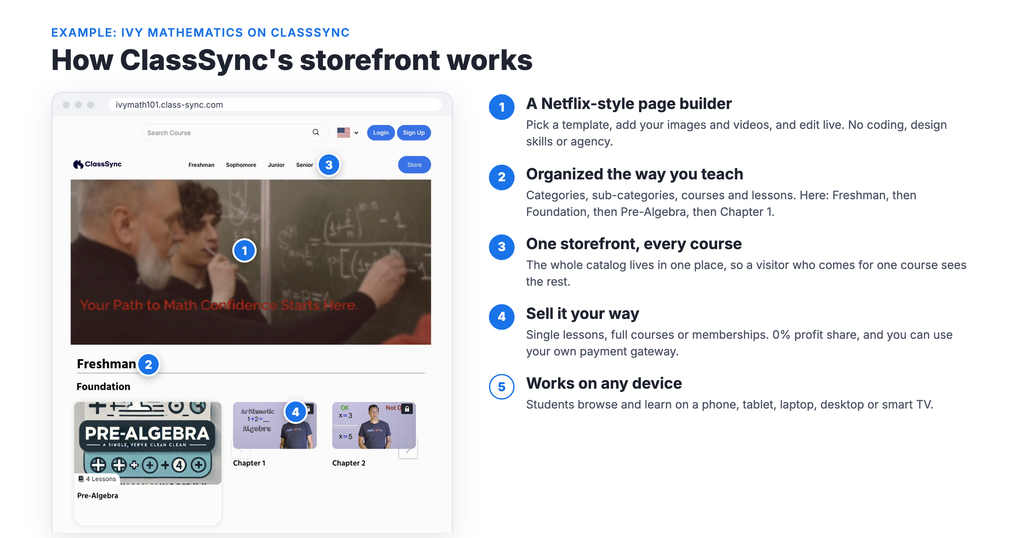
    A Netflix-style page builder. Pick a template, add your images and videos, and edit live. No coding or design skills needed, and no agency.

    Organized the way you teach. Arrange your academy into categories, sub-categories, courses and lessons. Piano, then Beginner, then Lesson 1. Or Baking, then Breads, then Sourdough. Students can see the path from one level to the next.

    One storefront, every course. Your whole catalog lives in one place, so a visitor who comes for one course sees the rest.

    Sell it your way. Offer single lessons, full courses or memberships, and keep 100% of your sales. ClassSync takes no profit share, and you can connect your own payment gateway.

    Works on any device. Students can browse and learn on a phone, tablet, laptop, desktop or smart TV.

    Other platforms use a catalog layout too, mainly video-membership services like Uscreen. ClassSync brings that browsing experience to academies with multiple programs and levels, without the setup work of building page after page.

    Frequently asked questions

    Do I need a separate sales page for every course?

    On Kajabi, each Offer gets its own checkout page, and you typically build a sales or landing page to send people to it. Teachable automatically creates a sales page for each course. On ClassSync, your courses live together on one Netflix-style storefront, so a new course goes into a category rather than onto a new page.

    Can students see my courses before they buy?

    On Kajabi, the Library only shows products a customer has bought or been granted, so the course itself is behind the purchase. Visitors see your sales pages first. On ClassSync, visitors browse your full storefront and see every course you offer.

    How do I get students to buy more than one course?

    Show them your other courses. A catalog layout puts your full range in front of every visitor. On one-page-per-course platforms, you’ll need upsells, recommended offers or email sequences to do the same job.

    Is a Netflix-style layout good for small academies?

    Yes, as long as you have more than one course or level. Even three courses arranged by level show students a clear path forward.

    Put your whole academy on display

    See what a catalog storefront looks like at our demo academies, Ryman Arts and Ivy Mathematics. Then pick a plan and build yours. No sales page for every course, and no agency.
  • The Hidden Cost of Course Platforms

    The Hidden Cost of Course Platforms

    Why so many people end up paying someone just to set up their course platform, and why it shouldn’t be that way.

    During COVID, my kids’ piano teacher was about to stop teaching. Her studio couldn’t run the way it used to. I suggested she move her lessons online, and I sat down with her to set up an account on one of the big course platforms.

    We gave up after two weeks.

    She wasn’t the problem. She’s a gifted teacher. The setup was simply too hard, and the platform sold one course at a time when she needed a real curriculum. She just wanted her students to be able to keep learning from her.

    That experience is why we built ClassSync. It also points to a bigger problem in this industry: platforms so complicated that a whole business has grown up around setting them up for you.

    Why platforms like Kajabi are hard for everyday people

    Kajabi is a capable platform. It bundles courses, websites, email marketing, sales funnels and automations in one place. For an experienced online marketer, that’s the appeal.

    But that power comes with complexity, and Kajabi’s own users say so. On Capterra, where Kajabi has 229 verified reviews, it scores 4.1 out of 5 for ease of use, lower than its overall 4.4. Reading the reviews, the same themes keep coming up:

    • One reviewer said it’s built more for business owners who already have tech knowledge.
    • Another listed a technical learning curve just to get things up and running.
    • A reviewer who liked Kajabi overall still said it can take time to understand how everything connects.
    • On Findstack, an agency user wrote that the learning curve for clients who aren’t tech people is “a little steep.” Another said they’ve had to train fairly tech-savvy people, because it doesn’t make sense at first.

    To be fair, plenty of reviewers also call Kajabi user-friendly. Experience varies. But the complaints share a theme: the platform assumes you already have tech knowledge. A piano teacher, a mom teaching crafts from home or a retiree sharing a lifetime of know-how may not have it, and shouldn’t need it.

    The setup industry, and what it costs

    When software is hard to set up, a market grows to set it up for you. Kajabi’s is easy to see.

    Kajabi runs its own Expert Marketplace of vetted professionals you can hire. Beyond that, Upwork, Fiverr, Guru and Freelancer.com all list Kajabi specialists offering site builds, funnel setup, course setup, migrations and ongoing support.

    Here’s what that help costs, from published rates:

    SourceWhat it shows
    Upwork Kajabi specialist listingsHourly rates from about $15 to $40
    GuruFreelance Kajabi experts usually charge $40 to $120 an hour
    DDIY hiring guideFreelance Kajabi developers charge about $50 to over $150 an hour
    A real Freelancer.com job post (Sept 2026)Full Kajabi setup for five courses: fixed price of $1,500 to $2,000, two to three weeks

    And it often doesn’t end at launch. Some Kajabi experts also sell monthly retainers, essentially a virtual assistant to handle updates and changes after the site goes live.

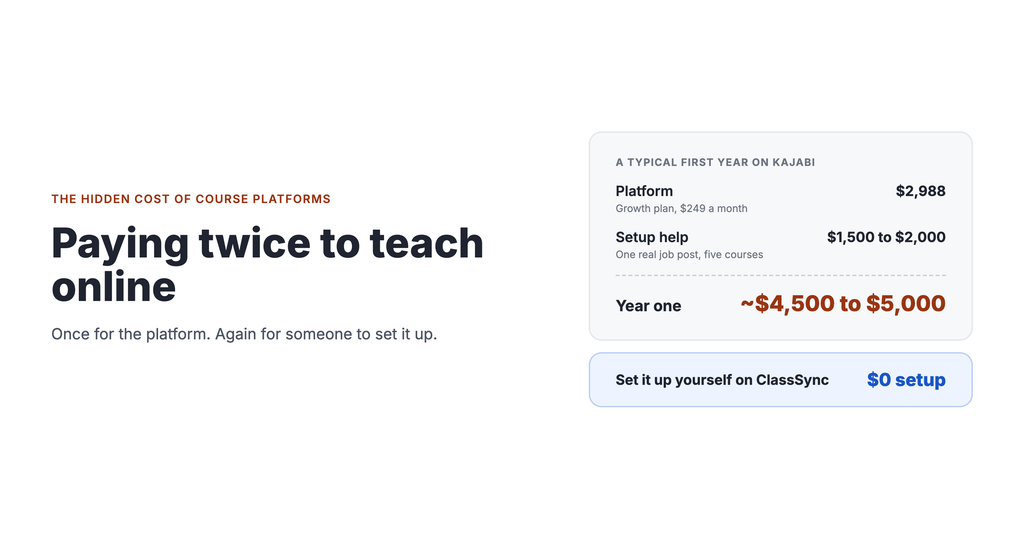
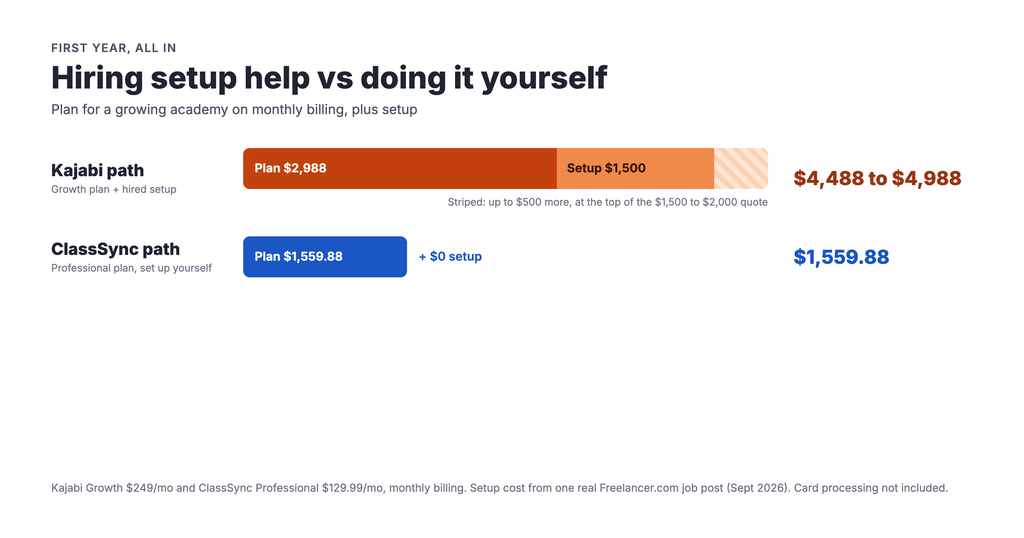
    What the first year can look like. Take that real job post as an example. Kajabi’s Growth plan, which a growing academy realistically needs, costs $249 a month, or $2,988 for a year on monthly billing. Add a $1,500 to $2,000 setup project and the first year comes to roughly $4,500 to $5,000, before any ongoing help.

    Kajabi itself charges no setup fee. The cost comes from needing someone else to do the setup.

    Why this isn’t helping the people who need it most

    We don’t blame the freelancers. They’re solving a real problem, and many do good work. Our issue is with the problem itself.

    You’re paying twice for one thing. You pay the platform every month for software that’s supposed to save you work. Then you pay someone else because the software is too hard to use.

    You lose control of your own academy. When someone else built your site and you don’t know how it fits together, changes can end up going back through them. New semester, new class, new price? That’s another invoice, or another week of waiting.

    The money comes out of teaching. Whether you run a small music school, a one-person tutoring business or a class from your kitchen table, $1,500 to $2,000 is real money. It could cover a new instructor’s hours, new equipment, or scholarships for students who can’t afford lessons.

    It filters out the people who need it most. The people who can’t afford setup help, like a parent starting a side class or a retiree passing on a craft, are often the ones who’d benefit most from going online. When the tool is the barrier, they simply don’t start.

    We think the fix isn’t better setup services. It’s software simple enough that you don’t need them.

    How ClassSync takes the setup problem away

    We built ClassSync for everyday people, not marketers. The goal from day one: anyone with a skill to share, whether a teacher, a coach, a mom or a retiree, with no coding or design skills should be able to launch their own online academy, alone, without hiring anyone.

    A page builder you can actually use. ClassSync’s Netflix-style page builder lets you pick a template, add your own images and videos, and edit live. What you see while editing is what your students see.

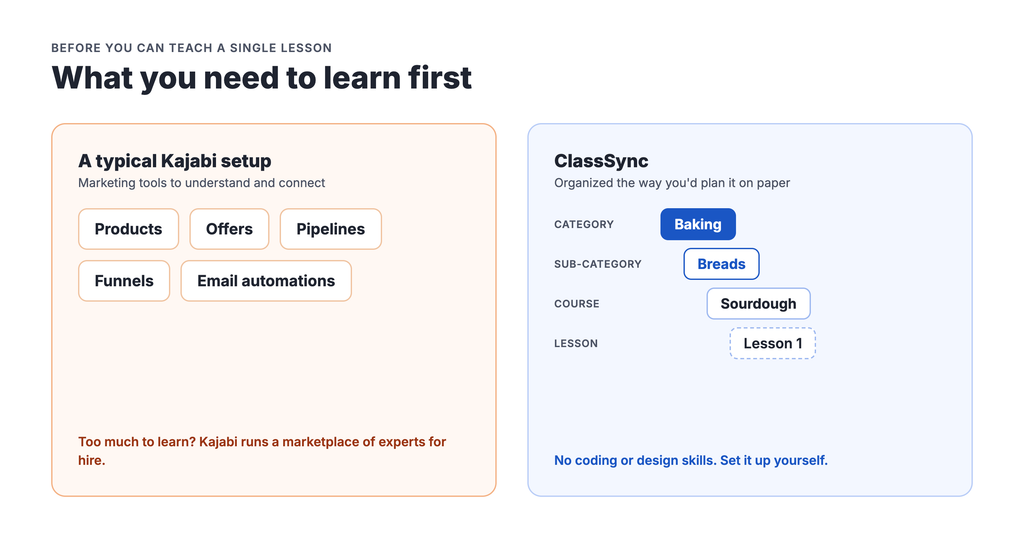
    Organized the way people already teach. No products, funnels or pipelines to learn. You set up categories, sub-categories, courses and lessons, just like you’d plan it on paper: Piano, then Beginner, then Lesson 1. Or Baking, then Breads, then Sourdough.

    Everything for running classes, built in. Announcements, FAQs and direct messaging keep students informed without extra tools. Progress tracking shows you who’s keeping up.

    Tested on real non-tech users. Before we called it ready, we had more than 10 people with no tech background, ranging from middle-aged to seniors, set it up.

    Help when you want it. Our Help Center has guides and tutorials, and our support team answers by email. You get help from us, included, not from a contractor billed by the hour.

    Here’s how the two paths compare:

    A typical Kajabi pathThe ClassSync path
    Who sets it upYou, or a hired Kajabi expertYou
    What you need to learnProducts, offers, pipelines, funnels, email automationsCategories, courses and lessons
    Setup cost$1,500 to $2,000 in our example job post$0
    Making changes laterYourself, or back to your expertYourself, with live editing
    Plan price for a growing academy (monthly)$249 (Growth)$129.99 (Professional)
    First year, all inAbout $4,500 to $5,000$1,559.88

    Want to start smaller? ClassSync’s Launch Pad plan is $29.99 a month.

    Frequently asked questions

    Is Kajabi hard to use?

    It depends on your background. On Capterra, Kajabi scores 4.1 out of 5 for ease of use, and several reviewers mention a technical learning curve. Reviews suggest it’s easier if you already have tech knowledge, and one agency user called the learning curve steep for clients who aren’t tech people.

    How much does it cost to hire a Kajabi expert?

    Published rates range from about $15 an hour on Upwork to over $150 an hour for experienced developers. A real full-setup job post we found offered $1,500 to $2,000 for a two to three week project.

    Do I need a designer or developer to use ClassSync?

    No. ClassSync is built so anyone can set up everything themselves, with no coding or design skills. You pick a template, organize your courses and edit live.

    What if I get stuck?

    ClassSync’s Help Center has step-by-step guides, and our support team answers by email.

    Build your academy yourself

    See what a finished ClassSync academy looks like: Ryman Arts and Ivy Mathematics. Then pick a plan and start building. No agency required.

  • Why Online Courses Are One of the Best Side Hustles in 2026

    Why Online Courses Are One of the Best Side Hustles in 2026

    How to turn what you already know into income, what the numbers really say, and how to get started without a big upfront bill.

    The short answer: online courses can be one of the most profitable side hustles because you create a lesson once and can sell it again and again, with no inventory and low running costs. On a $30 monthly membership, you can keep over 90% of every dollar after platform and card fees. The catch is that it takes real work to build an audience, and most side hustles start small.

    Almost everyone is good at something. A piano teacher, a mom who bakes sourdough every weekend, a retired engineer who can fix anything, a tutor, a yoga instructor. Ten years ago, turning that skill into income meant renting a room or finding students one at a time. Today you can teach anyone, anywhere, from home.

    Here’s why online courses work so well as a side hustle, what’s realistic, and how to start without hiring anyone or spending a fortune.

    Why online courses make such a strong side hustle

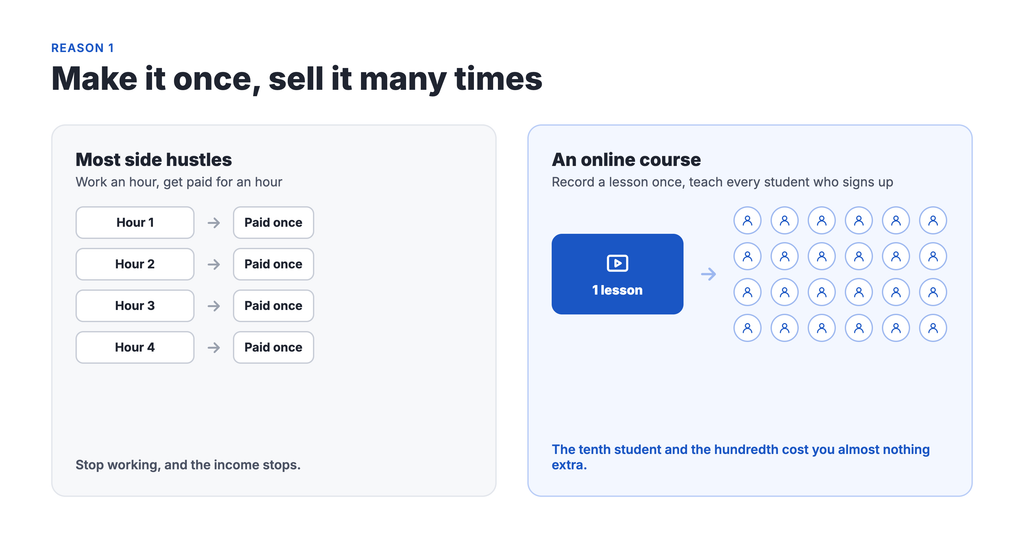
    1. You make it once and sell it many times

    Most side hustles trade hours for dollars. Drive for an hour, get paid for an hour. A recorded lesson is different. Once it’s made, the tenth student and the hundredth student cost you almost nothing extra.

    2. The margins are unusually high

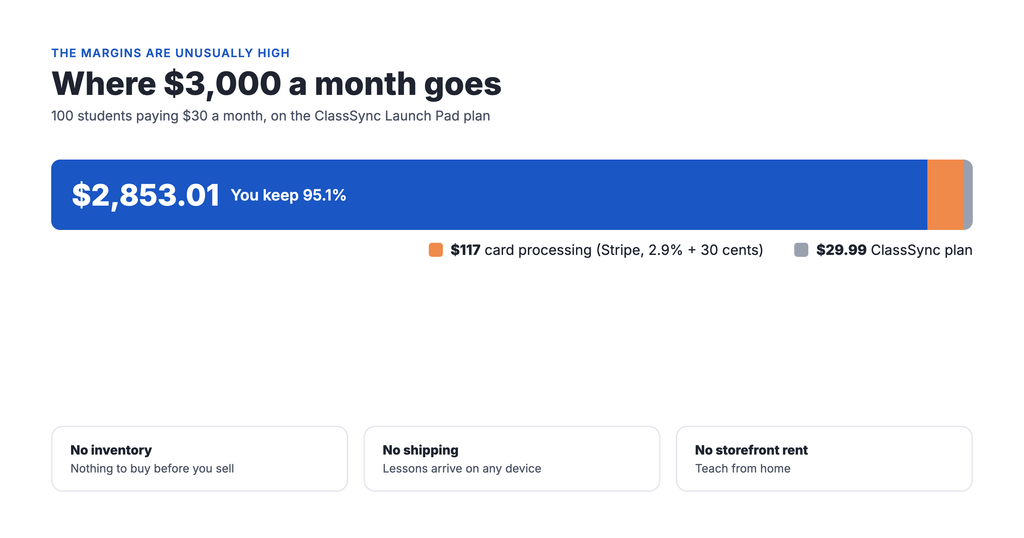
    There’s no inventory, no shipping and no storefront rent. Your main costs are a platform and card processing. Here’s what that looks like for a small side hustle with 100 students paying $30 a month:

    Amount per month
    Sales (100 x $30)$3,000
    Card processing (Stripe, 2.9% + 30 cents)-$117
    ClassSync Launch Pad plan-$29.99
    You keep$2,853.01 (95.1%)

    Compare that with selling crafts or reselling goods, where materials and shipping come out of every sale.

    3. Memberships create recurring income

    Instead of selling one course once, you can charge a monthly membership for ongoing lessons. That turns a side hustle into predictable income you can plan around.

    4. The market keeps growing

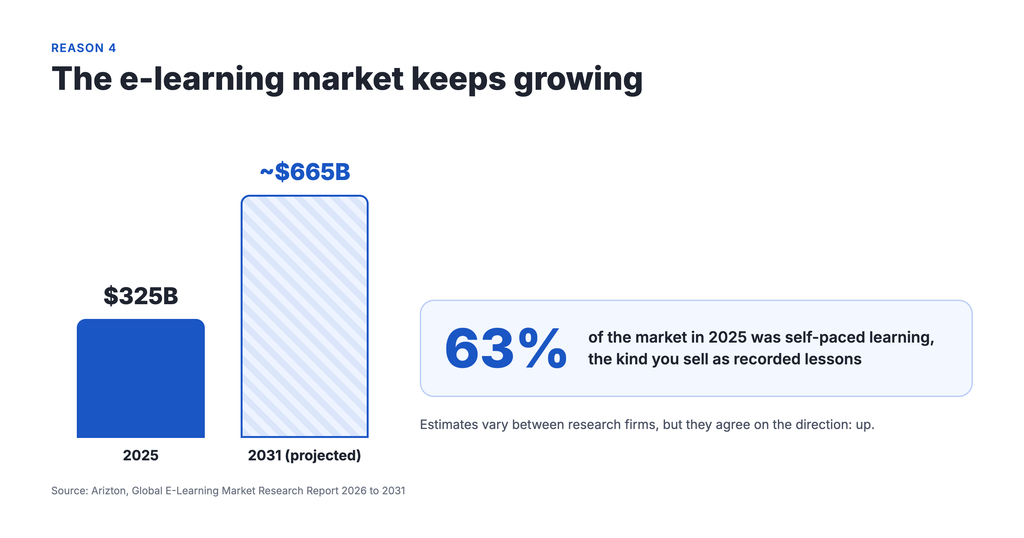
    One industry report valued the global e-learning market at $325 billion in 2025 and projects it will reach about $665 billion by 2031. Self-paced learning, the kind you’d sell as recorded lessons, made up about 63% of that market. Estimates vary between research firms, but they agree on the direction: up.

    5. Courses are what top creators earn the most from

    Kajabi’s State of Creators ’24 report surveyed over 2,000 creators worldwide. Creators earning six figures said online courses brought in the most revenue of any digital product, ahead of digital downloads and memberships.

    The honest part: what it really takes

    You’ll see plenty of “make six figures while you sleep” promises online. Here’s what the data actually says.

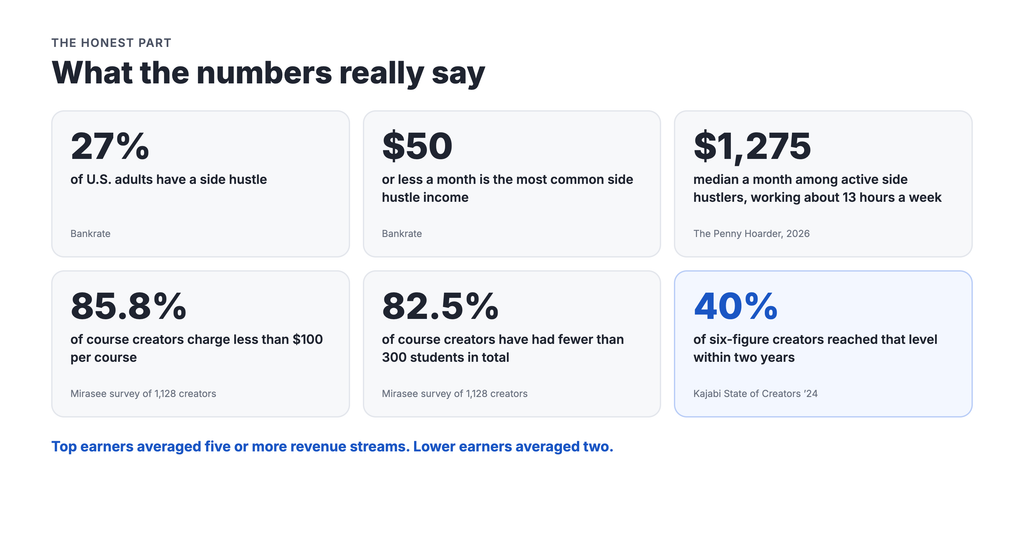
    Most side hustles start small. Bankrate found that 27% of U.S. adults have a side hustle, and the most common monthly earnings are $50 or less. The average is close to $900, pulled up by a smaller group of high earners. Another 2026 survey of active side hustlers by The Penny Hoarder put median earnings at $1,275 a month, with people working about 13 extra hours a week.

    Most course creators run small operations. A Mirasee survey of 1,128 course creators found 85.8% charge less than $100 per course, and 82.5% have had fewer than 300 students in total.

    “Passive income” is mostly a myth. Courses keep earning after you make them, but the creators who do well keep teaching, updating content and talking to their students.

    But the upside is real. In Kajabi’s survey, 40% of six-figure creators reached that level within two years. And the top earners had something in common: they averaged five or more revenue streams, while lower earners averaged two.

    The takeaway: start small, keep your costs low, and add income streams as you grow. That’s exactly where your choice of platform matters.

    Who can turn their skills into an online course?

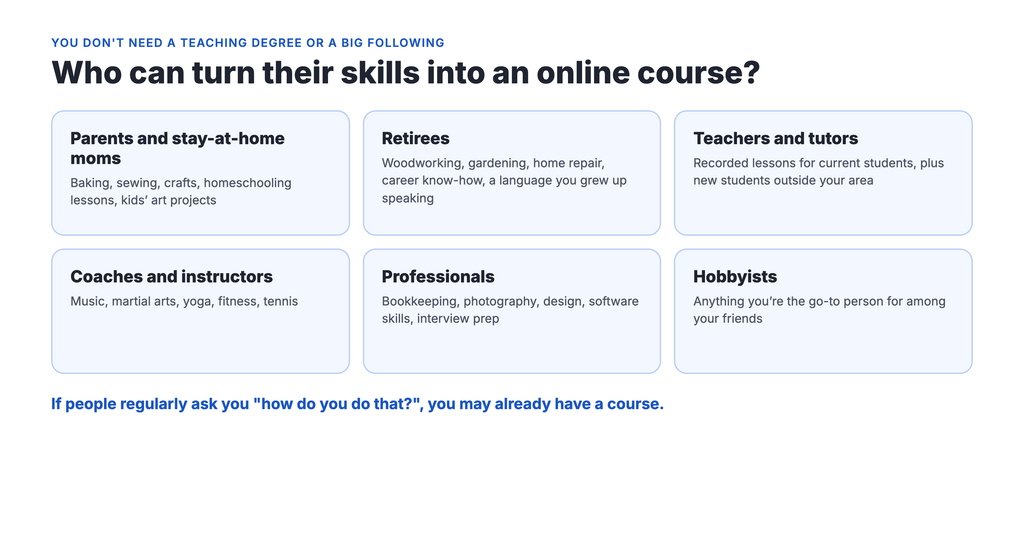
    You don’t need a teaching degree or a big following. You need a skill people want to learn and the patience to explain it well. A few examples:

    • Parents and stay-at-home moms: baking, sewing, crafts, homeschooling lessons, kids’ art projects.
    • Retirees: woodworking, gardening, home repair, career know-how built over decades, a language you grew up speaking.
    • Teachers and tutors: recorded lessons for current students, plus new students outside your area.
    • Coaches and instructors: music, martial arts, yoga, fitness, tennis.
    • Professionals: bookkeeping, photography, design, software skills, interview prep.
    • Hobbyists: anything you’re the go-to person for among your friends.

    If people regularly ask you “how do you do that?”, you may already have a course.

    Why ClassSync is built for side hustlers

    A side hustle has three needs: low cost, little time, and room to grow. ClassSync is designed around all three.

    Start for $29.99 a month. The Launch Pad plan gives you three courses and 20 hours of video storage. That’s enough to test your idea before spending more. For comparison, Kajabi’s cheapest public plan is $179 a month.

    Keep everything you earn. ClassSync takes 0% of your sales, and you can connect your own payment gateway. Only your card processor’s standard fee applies. When your side hustle grows, your platform bill doesn’t grow with every sale.

    Set it up in your spare time, by yourself. No coding, no design skills, no hiring someone. Pick a template, add your videos and images, and edit live. Your evenings go into teaching, not wrestling with software.

    Build more income streams in one place. Remember the top earners in Kajabi’s survey averaged five or more revenue streams. ClassSync lets you sell single lessons, full courses and memberships, run an affiliate program, host ads, and form partnerships, all from one academy.

    Organize it like a real program. Set up categories, sub-categories, courses and lessons, so students see a clear path: Baking, then Breads, then Sourdough. That makes it easy to sell the next level when they finish the first.

    Reach students on any device. Phone, tablet, laptop, desktop or smart TV.

    Grow when you’re ready. When your side hustle outgrows Launch Pad, Professional at $129.99 a month adds 18 courses, six admins and your own custom domain.

    Frequently asked questions

    Are online courses a profitable side hustle?

    They can be. With no inventory and low running costs, you can keep over 90% of each sale after platform and card fees. Earnings depend on your audience and effort: most course creators run small operations, but Kajabi’s survey found 40% of six-figure creators got there within two years.

    How much money can you make selling online courses?

    It varies widely. A Mirasee survey found most creators charge under $100 per course and have had fewer than 300 students. As an example, 100 students paying $30 a month is $3,000 a month in sales.

    How much does it cost to start selling online courses?

    Very little. ClassSync’s Launch Pad plan is $29.99 a month, plus card processing of about 2.9% plus 30 cents per payment through Stripe. You can record lessons with the phone you already have.

    Do I need technical skills to sell courses online?

    No. ClassSync is built so anyone can set up an online academy with no coding or design skills.

    Is selling online courses passive income?

    Partly. Recorded lessons keep selling after you make them, but successful creators keep updating content and engaging with students.

    Turn your skill into income

    See what a finished ClassSync academy looks like at Ryman Arts and Ivy Mathematics, then start with Launch Pad. Low cost to start, nothing taken from your sales, and no tech skills needed.

  • ClassSync vs Kajabi vs Teachable vs Uscreen

    ClassSync vs Kajabi vs Teachable vs Uscreen

    Which online course platform fits a music school, tutoring center or studio? An honest look at pricing, fees and structure, updated October 2026.

    Most platform comparisons are written for a solo creator selling one course. If you run a school, your needs are different. You might have piano, guitar and voice, each with beginner to advanced levels. That’s nine courses before you’ve added a single summer camp. You have more than one teacher. And you have families who expect a clear path from level to level.

    That changes which platform makes sense. A plan that looks cheap can get expensive fast if it caps your course count or charges per student.

    We compared four platforms through that lens: Kajabi, Teachable, Uscreen and ClassSync. Full disclosure: we make ClassSync, so we have a point of view. To keep it fair, every competitor figure below comes from their published pricing as of October 2026, and we link our sources at the end.

    ClassSync vs Kajabi vs Teachable vs Uscreen at a glance

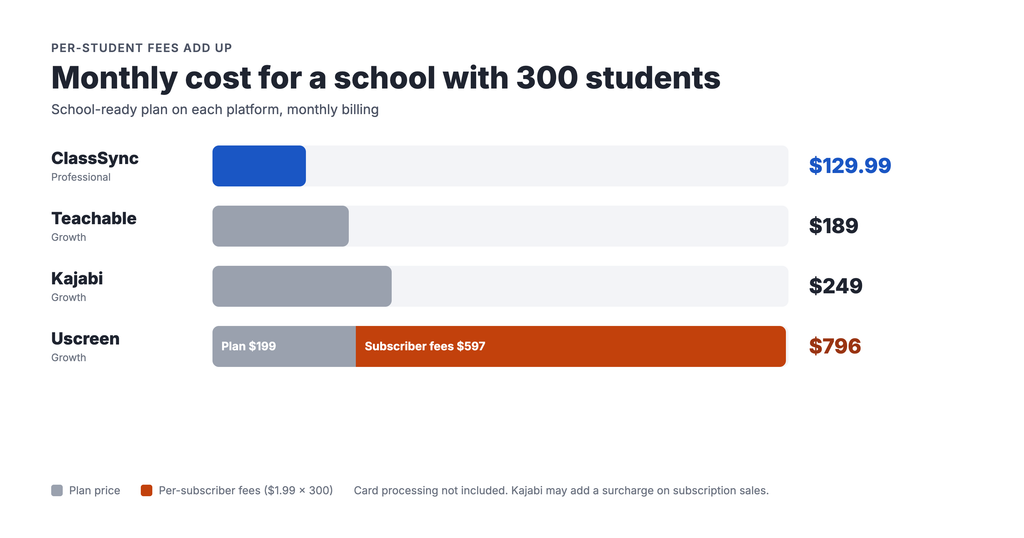
    The short version: for a school that needs its own branding and a team of teachers, ClassSync’s Professional plan costs $129.99 a month. The comparable plans on Kajabi, Teachable and Uscreen cost $189 to $249 a month, and Uscreen adds a fee for every student.

    We compare each platform’s school-ready plan: the lowest plan that gives you your own branding, several admin seats and room for multiple programs. Entry plans are listed at the bottom. All prices are monthly billing.

    ClassSyncKajabiTeachableUscreen
    Best forSchools and academies with several programs and levelsCreators selling courses and coaching, with built-in marketingCreators selling individual coursesVideo membership and streaming businesses
    School-ready planProfessional: $129.99/moGrowth: $249/moGrowth: $189/moGrowth: $199/mo + $1.99 per subscriber
    Monthly cost with 300 students$129.99$249*$189$796
    Platform fee on your sales0%, and you can use your own payment gateway0% with Kajabi Payments*0%5% on one-time sales
    Courses on that plan18 courses, organized by category, sub-category, course and lesson50 products50 productsUnlimited
    Admin seats on that plan610Multiple, with custom permissionsNot listed
    Your own brandingCustom domain includedBranding removal includedWhite-label site includedCustom domain included
    SetupDo it yourself: page builder with live editing, no coding or design skillsKajabi runs a marketplace of paid setup expertsDo it yourselfDo it yourself; migration help on $449+ plans
    Entry planLaunch Pad: $29.99/mo (3 courses, 1 admin)Basic: $179/mo (5 products, 1 admin)Starter: $39/mo (5 products, 100 students, 7.5% fee on sales)Starter: $49/mo (100 subscribers, 10% fee on one-time sales)

    *Since January 2026, reviewers report Kajabi adds a surcharge on subscription and payment-plan sales made through Kajabi Payments. Check Kajabi’s pricing page for current terms.

    Why we compare the higher plans. Entry plans look cheap, but most can’t run a real school. Kajabi Basic allows five products, one admin and doesn’t remove Kajabi branding. Teachable Starter takes 7.5% of every sale and caps you at 100 students. Uscreen Starter caps you at 100 subscribers on a Uscreen-branded web address. On each platform, a school with several teachers and its own brand ends up on the Growth plan.

    The hidden cost: who sets it up?

    The monthly price is only part of the bill. The other part is how long it takes to get running, and whether you can do it yourself.

    Kajabi does a lot, and doing a lot takes setup. Sales funnels, pipelines, email automations, landing pages, payment settings and membership access all need to be configured. That’s why Kajabi runs its own marketplace of experts you can hire, and why freelance sites are full of “Kajabi setup” gigs. A typical job post asks a freelancer to handle branding, product pages, landing pages, funnels, payment gateways and email sequences from scratch. For a creator building a marketing machine, that power is worth it. For a piano school that just wants its lessons online, it’s a lot of machinery to pay for and manage.

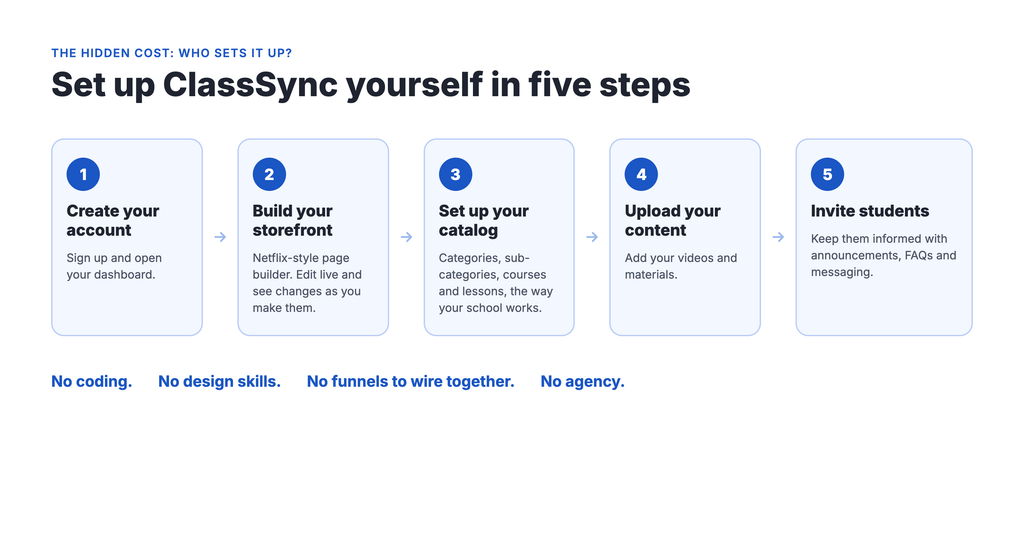
    ClassSync is built so you never need an agency. Here’s what getting started looks like:

    1. Create your account.
    2. Build your storefront with the Netflix-style page builder. You edit live and see changes as you make them.
    3. Set up your catalog the way your school already works: categories, sub-categories, courses and lessons.
    4. Upload your videos and materials.
    5. Invite students and keep them informed with built-in announcements, FAQs and messaging.

    No coding. No design skills. No funnels to wire together. We tested setup with more than 10 people who had no tech background before we called it ready, because we built it for school owners, not tech teams.

    Which platform fits which school

    Each of these platforms is good at something. Here’s an honest read on who each one suits.

    Kajabi: best for marketers who want everything in one place

    Kajabi bundles courses, email marketing, sales funnels and communities. If you’re building a personal brand around heavy marketing, that bundle is the appeal.

    For a school, the catch is cost. Kajabi raised prices and removed its cheapest public plan in January 2026. Basic, at $179 a month, allows five products and one admin, and keeps Kajabi branding. Affiliates, advanced automations and branding removal start on Growth, at $249 a month.

    Teachable: best for creators launching a course

    Teachable is simple to start and says its mobile app is included on every plan. It also handles sales tax and VAT through its own payments.

    The tradeoffs: Starter, at $39 a month, takes 7.5% of every sale and caps you at 100 students. A fully white-labeled school with multiple admins starts on Growth, at $189 a month. Teachable is built around selling courses as separate products rather than organizing a school catalog.

    Uscreen: best for video streaming and TV apps

    If your business is a video library people subscribe to, like a yoga or fitness channel, Uscreen is strong. It offers a Netflix-style catalog, live streaming, and branded mobile and TV apps.

    The tradeoffs for schools: Growth costs $199 a month plus $1.99 for every subscriber, every month. At 300 students, that’s $796 a month, and the bill keeps climbing as you enroll more. Branded mobile apps start at $449 a month plus $0.99 per subscriber.

    ClassSync: best for schools with multiple programs

    ClassSync is built for academy operators: music schools, tutoring centers, language schools and martial arts studios. Your online academy is organized the way your school already is. You pay one flat monthly price with no fee per student and no cut of your sales, and you can set it up yourself.

    Why schools choose ClassSync

    You can set it up yourself, today. No agency, no freelancer, no funnels to wire up. Pick a template, add your own images and videos, and edit the page live so you see exactly what students will see. No coding or design skills needed.

    It’s organized like a school, not a store. Kajabi and Teachable count every course as a separate product. ClassSync organizes your academy into categories, sub-categories, courses and lessons. Piano becomes a category. Beginner and Advanced become sub-categories. Each unit is a course with its own lessons. Students see a clear path from level to level, and you manage one catalog instead of a pile of products.

    One flat price, no matter how many students enroll. There’s no per-student fee, so your bill doesn’t grow every time a new family signs up. At 300 students, ClassSync Professional costs $129.99 a month. Uscreen Growth costs $796.

    You keep 100% of your tuition. ClassSync takes no share of your sales, and you can connect your own payment gateway. Only your card processor’s standard fee applies.

    Room for your whole team. Professional includes six admin seats and a custom domain, and you can assign instructors to their own courses, all under your school’s name.

    More ways to earn. Sell single lessons, full courses or memberships. You can also run an affiliate program, host ads, or form partnerships.

    Students learn on any device. Phone, tablet, laptop, desktop or smart TV.

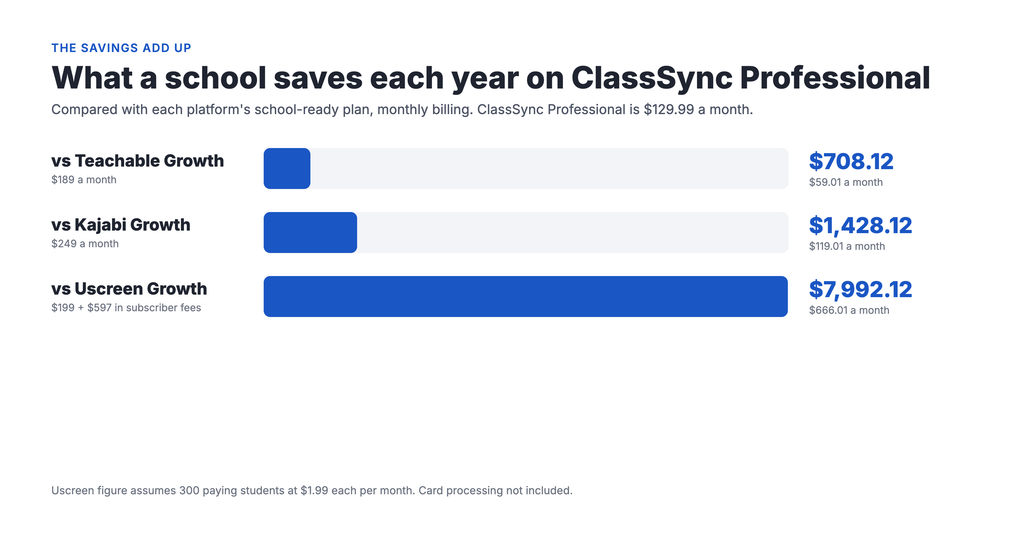
    The savings add up. Compared with each platform’s school-ready plan at monthly prices:

    Compared withTheir monthly costYou save each monthYou save each year
    Kajabi Growth$249$119.01$1,428.12
    Teachable Growth$189$59.01$708.12
    Uscreen Growth, 300 students$796$666.01$7,992.12

    See it for yourself. Two live demo schools show what a finished academy looks like: Ryman Arts and Ivy Mathematics.

    Frequently asked questions

    What’s the most affordable platform for an online academy?

    For a school that needs its own branding and several admins, ClassSync Professional is the lowest at $129.99 a month. The comparable plans are Teachable Growth at $189, Uscreen Growth at $199 plus $1.99 per subscriber, and Kajabi Growth at $249.

    Do I need to hire someone to set up Kajabi?

    Not necessarily. But Kajabi has many moving parts, from funnels to email automations, and enough people want help that Kajabi runs its own marketplace of experts for hire. ClassSync is designed so school owners can set everything up themselves.

    Is Kajabi’s $179 Basic plan enough for a school?

    Usually not. Basic allows five products and one admin, and it doesn’t remove Kajabi branding. Affiliates, advanced automations and branding removal start on the $249 Growth plan.

    Does Uscreen charge per student?

    Yes. On its Growth plan, Uscreen charges $1.99 per subscriber each month on top of the plan price. At 300 students, that’s $796 a month on monthly billing.

    Can I start small with ClassSync?

    Yes. Launch Pad costs $29.99 a month with three courses and 20 hours of video storage. When you’re ready for your own domain and your teaching team, move up to Professional.

    See how your school would look on ClassSync

    Browse our demo academies, Ryman Arts and Ivy Mathematics, or see plans and get started. You can have your catalog set up without hiring anyone.

  • How to Take Your Academy Online: 10 Steps for Schools and Studios

    How to Take Your Academy Online: 10 Steps for Schools and Studios

    A practical guide to taking your in-person school online, for music schools, tutoring centers, language schools and martial arts studios.

    You run a school. Maybe it’s piano lessons, SAT prep, Korean for kids, or a karate studio. At some point you’ve thought about teaching online, and then thought, “I wouldn’t even know where to start.”

    Most guides on this topic are written for YouTubers selling a single course. Running an academy is different. You have several programs, more than one teacher, levels that build on each other, and families who expect structure. You don’t need to become a content creator. You need an online academy that offers what you already teach to students who can’t always be in the room.

    We know this one personally. ClassSync started when a piano teacher we knew was about to stop teaching because COVID made her studio unworkable. We helped her try a big course platform. After two weeks we both gave up. Setup was too hard, and the platform sold one course at a time instead of a real curriculum. So we built the tool we wished she’d had.

    Here’s what we’ve learned about doing this well.

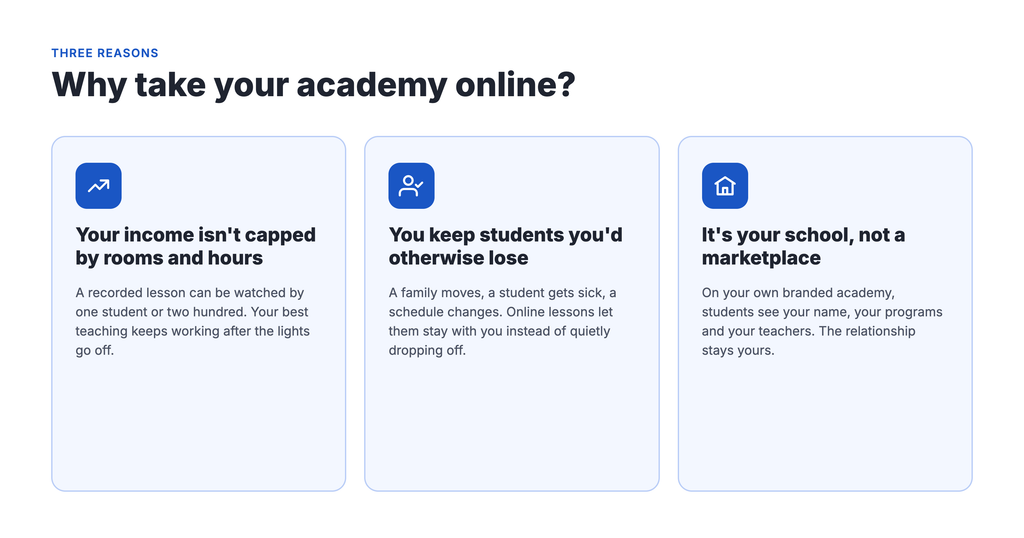
    Why take your academy online?

    Your income stops being capped by rooms and hours. In person, you can only teach as many students as you have chairs, teachers and evenings. A recorded lesson can be watched by one student or two hundred. Your best teaching keeps working after the lights go off.

    You keep students you’d otherwise lose. A family moves across town. A student gets sick and misses three weeks. A teen’s schedule changes in the fall. Online lessons give them a way to stay with you instead of quietly dropping off. Even a simple library of missed-class recordings makes a difference.

    It’s your school, not a marketplace. When you sell through a big platform, students find you next to your competitors. With your own branded online academy, they see your name, your programs and your teachers. The relationship stays yours.

    How to take your academy online in 10 steps

    1. Survey your current students and parents

    Your current students and parents are your best research. Send a short survey with a free tool like Google Forms. Keep it to 10 questions or fewer and focus on three things:

    • Their problems: missed classes, scheduling, travel time, wanting more practice between lessons.
    • What they’d pay for: would they pay extra for online access, or expect it included?
    • How they’d use it: short practice videos, full recorded lessons, or live online classes?

    Treat the answers as a guide, not a final vote. People can’t fully judge something they haven’t seen yet. Add a line at the end inviting them onto an early-access list. That list becomes your first launch group.

    2. Research other online programs in your field

    Search for online programs in your subject and area. Note what they include, how they price it, and what reviews complain about. You’re looking for gaps. Maybe nobody offers structured beginner-to-advanced levels. Maybe everyone sells loose videos with no clear path.

    3. Map your curriculum before you record

    This is where academies differ most from solo creators. You probably already teach in a structure: programs, then levels, then lessons. Piano might be Beginner, Intermediate, Advanced. Tutoring might be Math, then Algebra I, then individual units.

    Write that structure down before you record anything. It tells you what to build first and helps students see a path, which keeps them enrolled longer.

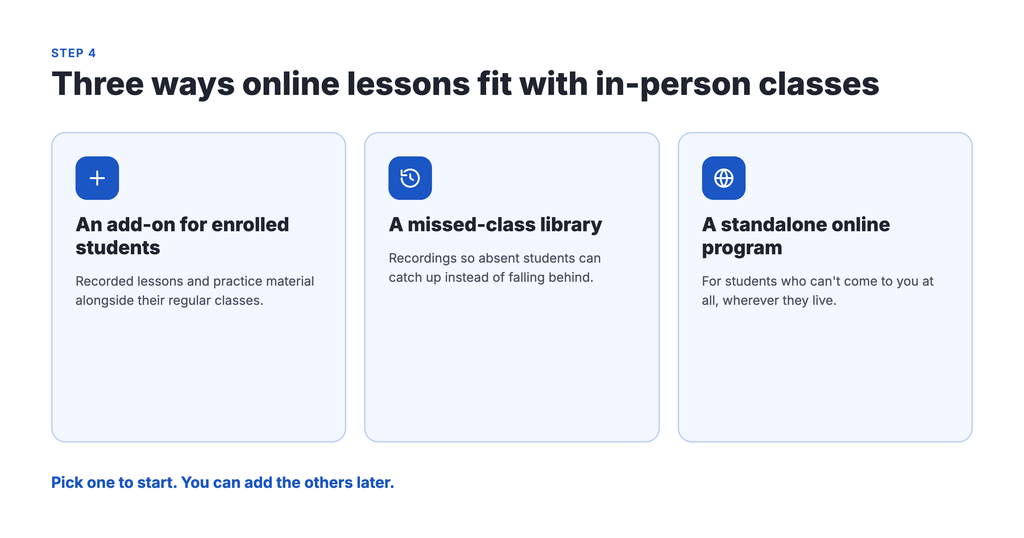
    4. Decide how online lessons fit with in-person classes

    There’s no single right model. Common ones:

    • An add-on for enrolled students: recorded lessons and practice material alongside their regular classes.
    • A missed-class library: recordings so absent students can catch up.
    • A standalone online program: for students who can’t come to you at all.

    Pick one to start. You can add the others later.

    5. Set simple pricing for online lessons

    Start with one plan, or two at most: a basic plan with core lessons, and a premium plan with extras like live Q&A or feedback on recordings. Offer monthly and annual billing. Monthly lowers the barrier, and annual rewards your committed families.

    Price on the value you provide, not on what feels safe. Then compare it with your survey results. If parents expected less, your job is to explain the value more clearly, not automatically to cut the price.

    6. Record a small first set of lessons

    You don’t need a huge library on day one. A few strong lessons per program is enough to launch, as long as students know more is coming and when.

    You also don’t have to start from scratch. Record a live class you’re already teaching. Turn your handouts into downloadable worksheets. Set aside one filming day a month and record several lessons at once.

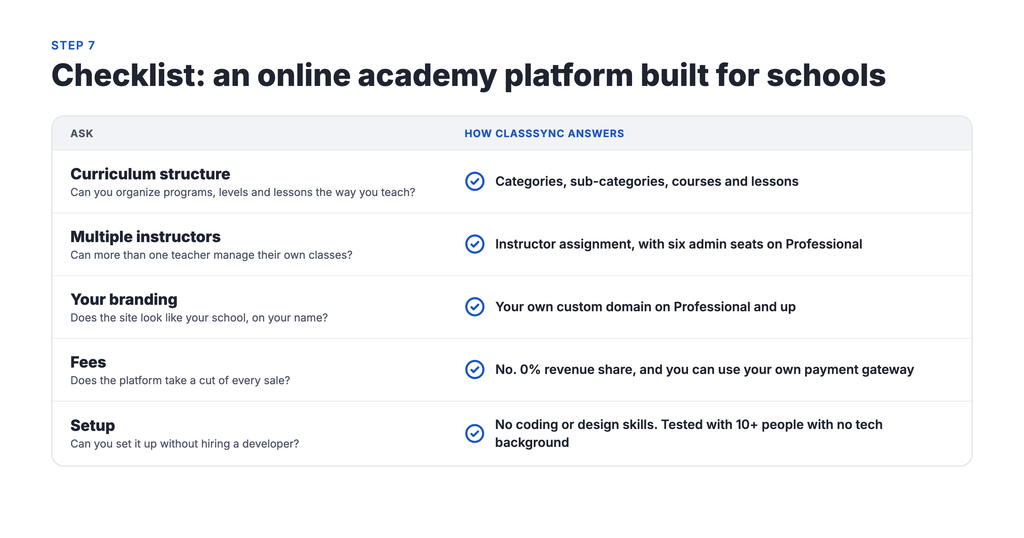
    7. Choose an online academy platform built for schools

    Many course platforms are designed for one creator selling one course. For an academy, check for these:

    • Curriculum structure: can you organize programs, levels and lessons the way you teach?
    • Multiple instructors: can more than one teacher manage their own classes?
    • Your branding: does the site look like your school, on your name?
    • Fees: does the platform take a cut of every sale on top of the monthly price?
    • Setup: can you or your staff set it up without hiring a developer?

    We built ClassSync around this list. It organizes content by category, sub-category and course, so your online academy mirrors your real one. It takes no revenue share. And we tested setup with more than 10 people who had no tech background before we called it ready.

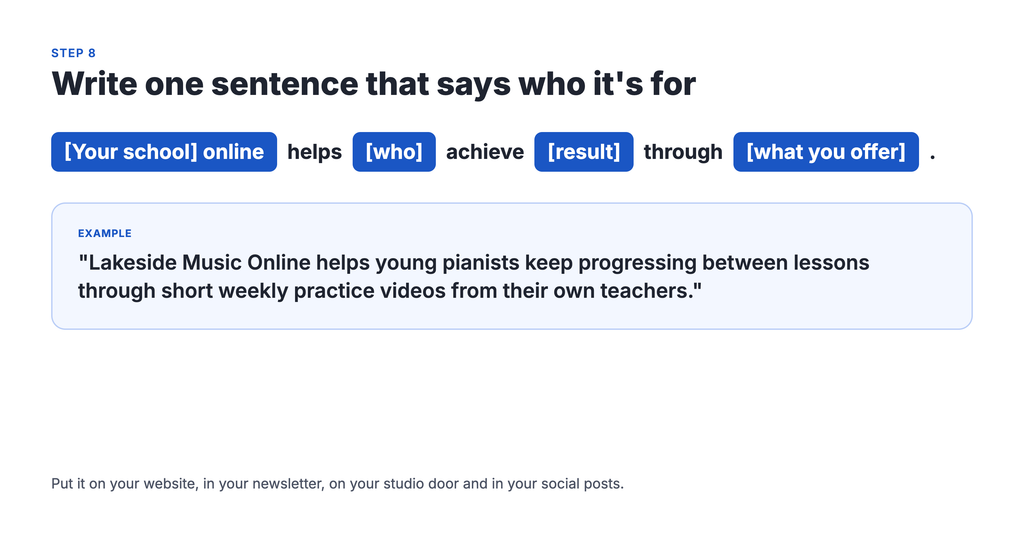
    8. Write one sentence that says who it’s for

    You don’t need fancy marketing. You need one clear sentence you can repeat everywhere. Try this formula:

    [Your school] online helps [who] achieve [result] through [what you offer].

    For example: “Lakeside Music Online helps young pianists keep progressing between lessons through short weekly practice videos from their own teachers.” Put it on your website, in your newsletter, on your studio door and in your social posts.

    9. Make the first week easy for new students

    The first few days decide whether a family sticks with it. Set up:

    • A short welcome video from you.
    • A “Start here” lesson that shows how to find everything.
    • A welcome email that points to the right first lesson for their level.

    If a parent can’t figure out where to click in the first five minutes, they won’t come back.

    10. Soft-launch, then open enrollment

    Start with the families on your early-access list. Give them a founding-member discount in exchange for honest feedback. Ask what’s confusing, what they actually watch, and whether the price feels fair. Fix what you learn.

    Then launch to everyone. Share a preview lesson, offer a limited-time early discount, and announce it in class. After launch, keep talking to your students. Their stories become your best marketing.

    Frequently asked questions

    What’s the difference between an online course and an online academy?

    An online course is one program with a start and a finish. An online academy is a whole school online: several programs, levels that build on each other, and often more than one teacher. If you already run a school, you need an academy, not a single course.

    How many videos do I need before I launch?

    Fewer than you think. A few strong lessons per program is enough to start, as long as students know when new lessons are coming. An easy way to grow the library is to record live classes you already teach.

    Should online lessons cost the same as in-person lessons?

    Not necessarily. Price on the value you provide. Two setups to consider: online access as a paid add-on for enrolled students, and a separate plan for students who learn only online. Your survey results will show what your families expect.

    Can I offer online lessons only to my current students?

    Yes. Starting with current students is the easiest way to test your online program. You can open it to new students later, once you’ve worked out what they use most.

    Do I need technical skills to set up an online academy?

    You shouldn’t. Look for a platform you or your staff can set up without a developer. If a platform needs outside help just to organize your programs, keep looking.

    Start with one program

    Taking your school online can feel like a big project. It doesn’t have to be. Pick one program, record a few lessons, invite a handful of families, and learn from them. Everything else can grow from there.

    Want to see what a finished online academy looks like? Browse our demo schools: Ryman Arts and Ivy Mathematics. When you’re ready, book a walkthrough with our team.